1. Go to Krypt website and log in to your account.
2.Click referral and choose referral account.
3. Click "Activate Referral Account" bottom.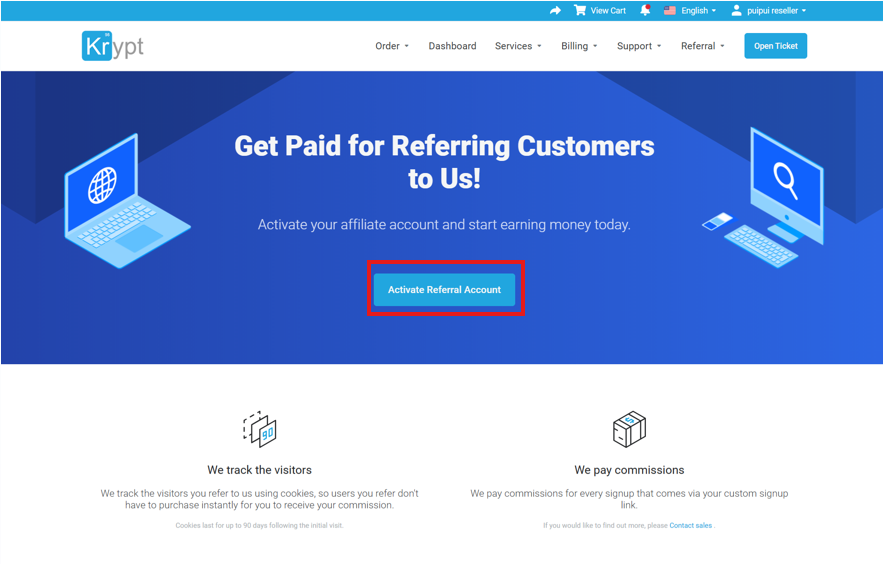
4. After that, you will see your Referral page and your Unique Referral Link.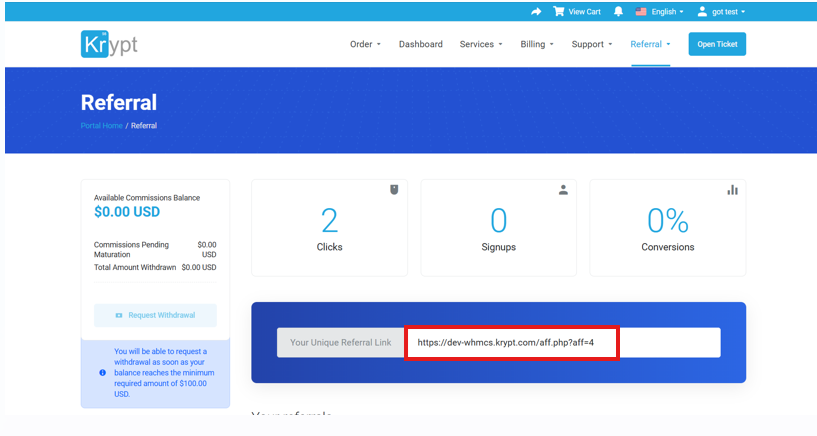

-
Order
- Dedicated Bare Metal Servers
- Dallas, TX (DAL1)
- Honolulu, HI (HNL1)
- New York/New Jersey (EWR1)
- Phoenix, AZ (PHX1)
- Silicon Valley, CA (SJC3)
- Silicon Valley, CA (SJC7)
- Singapore, SG (SIN1)
- -----
- Cloud Servers
- East Coast USA (US-EAST1)
- West Coast USA (US-WEST1)
- Singapore, SG (SIN1)
- -----
- Virtual Servers
- Promotions
-
What We Do
- Bare Metal Servers
- Dedicated Servers
- Dedicated Upgrades
- Cloud Services
- Cloud Servers
- Hybrid Cloud
- Cloud Backup
- Cloud Upgrades
- Data Protection
- Backup
- Cloud Replication
- Storage
- Services
- Managed Services
- Service Level Agreements
- Server Add-Ons
- DDoS Protection & Mitigation
- Advanced Firewalls
- Load Balancer
-
Data Centers
- California
- Los Angeles, CA (LAX2)
- El Segundo, CA (LAX13)
- Los Angeles, CA (LAX14)
- El Segundo, CA (LAX15)
- Los Angeles, CA (LAX16)
- Santa Ana, CA (SNA1)
- Silicon Valley, CA (SJC3)
- Silicon Valley, CA (SJC7)
- Silicon Valley, CA (SJC11)
- Silicon Valley, CA (SJC14)
- Arizona
- Phoenix, AZ (PHX1)
- Georgia
- Atlanta, GA (ATL1)
- New York/New Jersey
- New York/New Jersey (EWR1)
- Texas
- Dallas, TX (DAL1)
- Dallas, TX (DAL6)
- Massachusetts
- Boston, MA (BOS1)
- Washington
- Seattle, WA (SEA1)
- Hawaii
- Honolulu, HI (HNL1)
- Poland
- Warsaw, PL (WAW1)
- Singapore
- Singapore, SG (SIN1)
- Company
- Support
- Referral
- Blog
- Login



 WeChat: Krypt98Official
 QQ:
QQ: 
 +1-855-579-7888